Highlight: Your Go-To Font for Joyful, Elegant Designs
More Than Just a Pretty Script
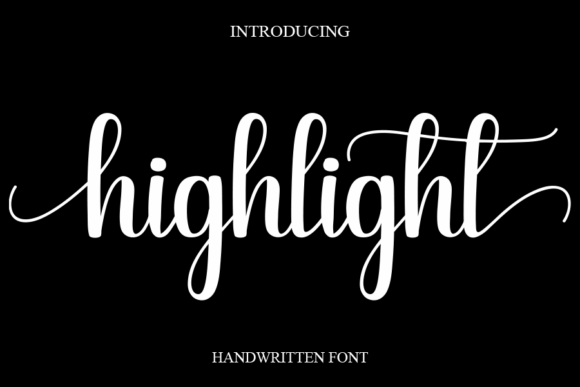
In the crowded world of digital assets, finding a typeface that feels both personal and professional can be a challenge. Highlight, a sweet and cursive handwritten font, strikes that delicate balance beautifully. It’s not just a collection of letters; it’s a design element with a distinct personality—gentle, romantic, and inherently joyful. This premium font avoids the pitfalls of many script typefaces, which can feel either overly formal or messy. Instead, Highlight offers a flowing, connected style that feels authentic and approachable, making it a versatile tool for creators across many fields.
The visual appeal of Highlight lies in its subtle details. The letterforms have a natural, hand-lettered quality with gentle curves and consistent, fluid connections. This creates a rhythm that’s easy on the eyes, guiding the reader smoothly from one character to the next. Unlike some highly decorative script fonts, Highlight maintains a clarity that supports legibility, even at smaller sizes. Its style bridges the gap between casual and elegant, making it a fantastic choice when you want your design to look fancy and refined but still welcoming and relaxed.
Where Highlight Truly Shines: Real-World Applications
Understanding a font’s strengths helps you deploy it effectively. Highlight’s sweet, cursive nature makes it ideal for projects where warmth, romance, and a touch of whimsy are desired. Think beyond the obvious wedding invitation—though it’s perfect for those.
- Branding and Logo Design: For businesses in the lifestyle, beauty, boutique retail, or artisanal food space, Highlight can form the core of a brand identity. It works wonderfully as the main logotype for a bakery, florist, or indie cosmetics line, instantly conveying a handcrafted, personal touch.
- Editorial and Publishing: In editorial design, Highlight excels as a display font for headlines, chapter titles, or pull quotes in magazines, blogs, and lookbooks. It adds a layer of sophistication and personality to fashion spreads, recipe headers, or lifestyle articles without overwhelming the body text.
- Marketing and Social Media: The font’s joyful character makes it a standout for social media graphics, email newsletter headers, and promotional flyers. It can grab attention in a crowded feed, especially for announcements, sale tags, or inspirational quotes where emotional connection is key.
- Packaging and Print: On packaging design for products like candles, soaps, stationery, or gourmet treats, Highlight adds perceived value and a boutique feel. It’s also excellent for greeting cards, thank-you notes, and personal stationery, turning simple messages into cherished keepsakes.
- Digital and Web: While primarily a display font, Highlight can be used strategically in web design for hero text, call-to-action buttons, or logo lockups to establish a brand’s voice immediately upon landing on a page.
The key is to match the font’s personality to your project’s goals. Highlight isn’t the right choice for a corporate law firm’s annual report, but it’s a perfect fit for a wedding planner’s portfolio or a café’s seasonal menu.
Using Highlight Effectively: Practical Guidance
Integrating any new typeface into your workflow requires a bit of strategy. Here’s how to get the most out of Highlight.
First, always evaluate the project fit. Before you even install the font, ask: Does my project need to feel romantic, gentle, or celebratory? If the answer is yes, Highlight is a strong contender. If you need high-contrast, ultra-modern, or starkly minimal typography, you’ll likely need a different creative font, perhaps a clean sans serif.
Next, consider font pairing. Highlight, as a script display font, needs a partner that provides balance and readability for longer text. The classic pairing strategy is to combine it with a neutral, sturdy sans serif font or a traditional serif font. For example, pairing Highlight with a font like Lato or Open Sans for body text creates a beautiful hierarchy—the script font delivers the emotion and the headline, while the sans serif delivers the information clearly. Avoid pairing it with other ornate or competing script fonts.
Always test for readability in context. View Highlight at the actual size it will appear in your final design. Check how it looks on both a desktop screen and a mobile device. Ensure that any connected letters in words like “love” or “design” remain legible. For very small text, like footnotes or disclaimers, it’s best to switch to your paired body font.
Finally, review the font package. A quality premium font like Highlight often comes with multiple styles—perhaps alternates, swashes, or ligatures. Explore these OpenType features in your design software. They allow you to customize the look, swapping out a standard letter for a more decorative initial or final form to add extra flair to a logo or headline. Also, verify the licensing. Ensure the commercial font license covers your intended use, whether it’s for a client’s logo, a product you sell, or a website. This professional step protects you and respects the font designer’s work.
By treating Highlight as a specialized tool in your design assets kit, you can leverage its strengths to create cohesive, engaging, and emotionally resonant designs that stand out and connect with your audience on a personal level.