Architect Pro: A Modern Font for Professional Design
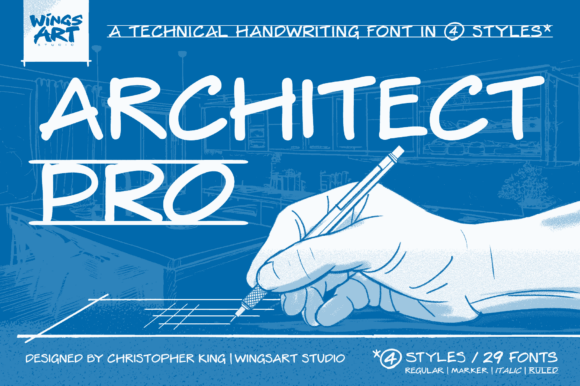
When you see a piece of design that feels instantly trustworthy, clean, and authoritative, the typography is almost always doing the heavy lifting. There’s a specific kind of lettering that evokes this feeling—a style born not from artistic flourish, but from the absolute necessity for clarity and precision. This is the world of architectural drafting, and Architect Pro is a premium font that captures this legacy with a contemporary edge. It’s more than just a typeface; it’s a design asset that injects instant professionalism into any project.
Before screens and CAD software, architects and engineers communicated through hand-drawn blueprints. Every letter on those plans had to be perfect. A misread "1" could be mistaken for a "7," a sloppy "E" could look like an "F"—such errors were not just inconvenient but costly. This pressure forged a unique style of lettering: all caps, with uniform stroke widths, generous spacing, and a geometric, block-like structure. It was designed for one purpose: to be read quickly and accurately by anyone, from the designer in the studio to the builder on a noisy construction site. Architect Pro is a digital homage to this functional elegance.
The Anatomy of Architect Pro: More Than Just Block Letters
At first glance, you might categorize Architect Pro as a simple sans serif font. But look closer, and you’ll see its unique character. It’s a display font at heart, meaning it’s crafted to make a statement in headlines and logos. Its personality is defined by a few key visual traits:
- Geometric Precision: The letterforms are built on clean, mathematical shapes. Circles are perfect, and angles are sharp. This gives it a highly structured, engineered feel.
- Monolinear Strokes: Unlike many typefaces where strokes vary in thickness, Architect Pro maintains a consistent weight throughout each letter. This is a direct nod to the technical pens used in drafting, contributing to its clean, uniform appearance.
- Generous Letter-spacing: The space between each character (known as tracking) is intentionally open. This isn’t just for style; it enhances legibility, especially at smaller sizes or when viewed from a distance, just as it did on original blueprints.
- Subtle Character: While it’s a technical font, it’s not cold. The slightly rounded terminals (the ends of strokes) soften its edges, giving it a more approachable and modern feel compared to a stark, purely geometric typeface.
This combination creates a typeface that feels both authoritative and accessible. It speaks of expertise and meticulous planning without being intimidating. It’s a creative font that understands the importance of function.
Where Architect Pro Truly Shines: Real-World Applications
The true value of any typeface is how it performs in the wild. Architect Pro’s strength lies in its versatility across a surprising range of projects. Its clean aesthetic makes it a workhorse for designers, entrepreneurs, and creators who need to communicate clearly and confidently.
Branding and Logo Design
For a brand that wants to project stability, innovation, and trust, Architect Pro is an excellent choice for logo design. Think of industries like construction, engineering, tech startups, real estate, finance, or professional consulting. A logo set in this font immediately signals a solid foundation and attention to detail. It’s a fantastic tool for building a strong brand identity that feels both timeless and contemporary. Pair it with a simple icon or let the powerful letterforms stand alone.
Editorial and Publishing
In editorial design, visual hierarchy is everything. Architect Pro makes for stunning, commanding headlines in magazines, annual reports, and book covers. Its all-caps nature demands attention, while its clean lines ensure it doesn’t overwhelm the layout. It pairs beautifully with a classic serif font for body text, creating a dynamic contrast that is both sophisticated and easy to read. For bloggers and content creators, using it for post titles or pull quotes can instantly elevate the look of a website.
Digital and Web Design
Clarity is paramount in digital interfaces. Architect Pro excels in web design for navigation menus, section headings, and call-to-action buttons. Its high legibility on screens, even at small sizes, ensures a smooth user experience. For social media, it’s a powerhouse. Use it for bold, impactful text overlays on Instagram graphics, YouTube thumbnails, or Pinterest pins to stop the scroll and deliver a clear message.
Packaging and Physical Products
On a crowded shelf, packaging needs to be clear and compelling. Architect Pro is a superb choice for packaging design, especially for products that want to convey quality, precision, or a modern, minimalist aesthetic. Imagine it on the label of a craft spirit, a high-end electronics box, or artisanal food packaging. It communicates value and craftsmanship before the customer even reads the product description.
Practical Guidance for Using Architect Pro in Your Projects
Ready to put this premium font to work? Here’s a practical guide to integrating it effectively into your design workflow.
- Evaluate the Project Fit: First, consider the personality of your project. Is it meant to be formal, technical, modern, or authoritative? Architect Pro fits these moods perfectly. It might not be the best choice for a whimsical children’s brand or a vintage-themed wedding invitation, but for anything that requires a dose of professionalism, it’s a strong contender.
- Master Font Pairing: A great design often uses multiple typefaces. As a sans serif font with a strong personality, Architect Pro works best when paired with something more subdued for body copy. Try combining it with a traditional serif font like Garamond or Georgia for a classic, high-contrast look. For a more modern, clean feel, pair it with a simple, readable sans serif like Lato or Open Sans.
- Test for Readability: Always test your typography in context. View your design at the size it will be seen. Is the headline on your website mockup legible on a mobile screen? Is the text on your product label clear from a few feet away? The generous spacing of Architect Pro generally aids readability, but real-world testing is non-negotiable.
- Explore the Included Styles: A good commercial font often comes with more than one weight. Check if Architect Pro includes variations like Light, Regular, and Bold. Using different weights from the same typeface family is an excellent way to create subtle hierarchy and visual interest while maintaining perfect consistency across your design assets.
- Understand the License: Before you download any font, especially a premium font, make sure you understand the commercial license. Ensure it covers all your intended uses, whether for a client project, a commercial website, print materials, or products for sale. This protects you legally and supports the type designers who create these valuable tools.
Ultimately, typography is a silent ambassador for your message. Choosing a typeface like Architect Pro